Blocklingo is a multilingual plugin for WordPress block themes with AI translation, now approved on wordpress.org. This is how it is built: about 10,700 lines of PHP in 96 classes, 1,800 lines of plain JavaScript, and 371 automated tests.
The goal and the constraints
The goal was simple to say: translate a whole block theme site - content, menus, header, footer, SEO - with AI, without breaking a single block.
The constraints shaped every decision:
- It runs on client sites. A bug in the plugin must never take a site down.
- No build step, no runtime Composer. PHP 8.1+ with its own PSR-4 autoloader and plain
wp.*JavaScript, so anyone can read and patch it. - No lock-in. One post per language, stored as normal WordPress posts. Deactivate the plugin and the content is still there.
- wordpress.org rules. Prefixes, escaping, sanitizing, no tracking, every external call documented.
Architecture
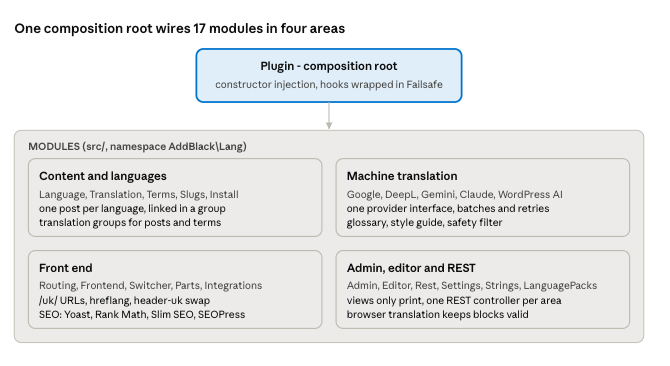
Plugin is the only place that creates services; every class gets its dependencies through the constructor and adds its hooks in register(), never in the constructor. Database and HTTP calls live only in repositories and providers, admin views only print the variables they get, and includes/functions.php is a thin public API over the services.
Three hard problems
1. Translating blocks without breaking them
Gutenberg stores blocks as HTML plus a JSON comment, and the editor checks that both still match. Translate the HTML on the server with a regex and the editor shows "This block contains unexpected content".
So translation runs in the browser, inside the block editor. Blocklingo walks the block tree, collects the translatable attributes, sends them to the provider and re-serializes each block with WordPress's own serialize(). The blocks come out valid by construction. Even "Translate everything" uses this path: it loads each post in a hidden editor and translates it the same way. Only classic-editor content, which has no blocks, is translated on the server.
Two details mattered in practice: shortcodes are never sent to the AI (a translated [contact-form-7] is a broken form), and any script, event handler or javascript: link that the original text did not have is stripped from the answer.
2. Header and footer per language
In a block theme the header and footer are template parts, shared by every page. Blocklingo creates language copies (header-uk) and swaps them in when the page is Ukrainian. Navigation menus and synced patterns inside them follow the page language too.
The catch: themes like Twenty Twenty-Five keep the header in a theme pattern, so a copy of the part only pointed at the same English pattern. The fix was to copy the pattern's blocks into the part, then translate them. It also copies only the parts your templates use - Twenty Twenty-Five ships seven, but shows two.
3. Bulk translation that survives real hosting
Translating a whole site means hundreds of AI calls from a browser tab. Things go wrong: hosts cut requests at 60 seconds, keys run out of credit, login sessions expire.
- Texts go in batches of 15 texts or 1,500 characters; a batch that times out is split in two and sent again.
- Order matters: terms, then menus, then header and footer, then posts, so links in content already point to translated categories.
- After 3 failures in a row it pauses and asks; on blocking errors (no key, rejected key, no credit, rate limit, expired login) it stops at once.
- Every result is saved as a draft for review, never published automatically.
Quality: how it stays safe on client sites
Every commit passes one command, composer check:
| Check | Tool | Bar |
|---|---|---|
| Coding standards | PHPCS with WordPress Coding Standards | 0 errors |
| Static analysis | PHPStan | Level 6, no baseline |
| PHP tests | PHPUnit against a real WordPress | 371 tests in 38 files |
| JS tests | node --test | Block walking, errors, bulk queue |
| wordpress.org review | Plugin Check | 0 errors |
The rule for bugs is test first: reproduce it in a failing test, then fix it.
Failsafe. Every hook is registered through a small wrapper (Hooks::action(), Hooks::filter()), never add_action() directly. If a callback throws, the error is logged and that step is skipped - the page still loads. If the plugin cannot start at all, for example after a broken upload, it switches itself off for that request and shows administrators a notice. Visitors see nothing.
Security. Machine translation needs the publish_posts capability, so Contributors cannot spend the site's API key. Saved keys are never printed back into the settings page. All SQL goes through prepared statements in repositories, and nothing is sent to any provider in the background.
Errors people can act on. Instead of "The response is not a valid JSON response", users see "The translation provider rejected the API key" with what to do next, a "Contact the developer" button and a "Show technical details" toggle for me.
Shipping to wordpress.org, and what I learned
The wordpress.org review asked for prefixes of 4+ characters, so version 0.13.0 renamed every global name from abl_ to blocklingo_ - functions, hooks, constants, REST routes, CSS classes - with an automatic migration of settings, tables and links on update. The plugin moved into the blocklingo/ folder to match the slug. Version 0.14.0 added WordPress AI as a provider: on WordPress 7.0+ it uses the AI connector the site already has, with no separate key.
What I would tell anyone building a plugin like this:
- Let the platform do the hard part. Re-serializing blocks with Gutenberg's own code beat every server-side parser I could have written.
- Design for failure first. Most of the work in bulk translation is not translation - it is timeouts, retries, credits and clear messages.
- Test on real themes. The Twenty Twenty-Five pattern issue only showed up on a real site.
- Write the rules down. A
CLAUDE.mdin the repo holds the architecture rules, so I and my AI coding assistant follow the same conventions on every change.
Blocklingo is free on wordpress.org. If you need a plugin built with the same care, or a multilingual site, get in touch.